Sunday, May 11, 2014

Week 1 Lynda.com Certification: Writing Articles


Just finished the Lynda course for Writing Articles. It gave me some ideas about what to look at for my next project.

Thursday, May 8, 2014

Week 1 Analysis: Competitor Research

http://www.comfortkeepers.com/      
http://love2livecare.com/


http://absoluteseniorcare.com/

http://www.visitingangels.com/


   The site I chose to work on was Harry’s No’Owie in home care. I liked this concept because it is an idea that could really work. I checked into a few Senior In-home Care service sites and found a few trends that might work and a few that will set Harry apart.
            First we will look at a few of the trends on the other sites. The most common and glaringly obvious was the picture. All the sites showed a young adult helping or being active with a senior. Some like Absolute Senior Care have fancy graphics to switch the photo, whereas “Live to Love” is more like a news article with simple stationary pictures. I think the simple format and soft colors that run through all the sites work for the target audience.
            I think the biggest difference these sites have from Harry’s business is that his feel like there is a bit more of a personal touch. Most of the sites with multiple pictures show a different employee with each client. Harry’s business feels like he personally will be going to meet with and help each client. I feel like that’s an angle we could use on the site.
            The muted colors and large print that runs through all the sites is a good idea considering the audience, which is something I would like to use on the site for No’Owie. A few of the key works that I noticed on the sites are “trust” and “care” these are easy to work in especially if we are playing the small business angle.
            All the sites are playing to an older audience. With the use of Large Font, soft colors, large photos, and simple page layout. The nurturing words like “care”, “friendly”, ‘trust” and “home” are all more for the client’s family. It is there to give them peace of mind about their loved ones. These are all aspects we should use in the new site.

Tuesday, May 6, 2014

Week 1 Practice: Target Audience

Hi,

For this assignment I am including the whole progression to the final description.

Business or Entity:
No’ Owie
Target Audience Characteristics:
Elderly, Needs in home care, Middle class, Technologically Limited, Has Middle Age Children, Digital Immigrant, Prefers large print, Drawn to Clean Lines, likes pictures, Seeks Professionalism yet nurturing, not rushed, Discerning, Care-Oriented, Not Busy.

Business or Entity:
No’ Owie
Target Audience Profile:
The target audience for No’ Owie are Elderly and in need of some amount of in home care. They are not busy but their extended family is. The need for a professional caregiver is felt by the whole family. The target audience is not technically savvy and therefore needs to find what they are looking for with limited navigation and large easy to read font. They prefer a minimal design with lots of pictures. This audience needs to be made to feel comforted and appreciated. They are looking for someone with a nurturing and professional manner.


Business or Entity:
No’ Owie
Ideal Visitor Description:
The ideal visitor to an MCBS student portfolio site is a family with and elderly member in need of in home care. They are looking for a nurturing professional with understanding of their needs and situation, to care for their loved ones like a member of the family.

Week 1 Project: Proposal & Wireframe


Proposal:

The Goal of this web-site is go get the name of No’ Owie out to the people that will benefit from the services. We will make a Site that is easy to follow and intuitive to navigate. Our website will be appealing to the client as well as their family; our goal is to bring peace of mind to all involved.
We can get this site online for $500.00 which will get the site built active and hosted for one year. Because of the scale of the project we can have it built and in testing in one week and live in one more week.
After the contract is signed we can meet up and work on the style, color and aesthetics of your new website. Getting you name and face out there is the first step to broadening your audience base and bringing in new clients.  

Wire Frame:


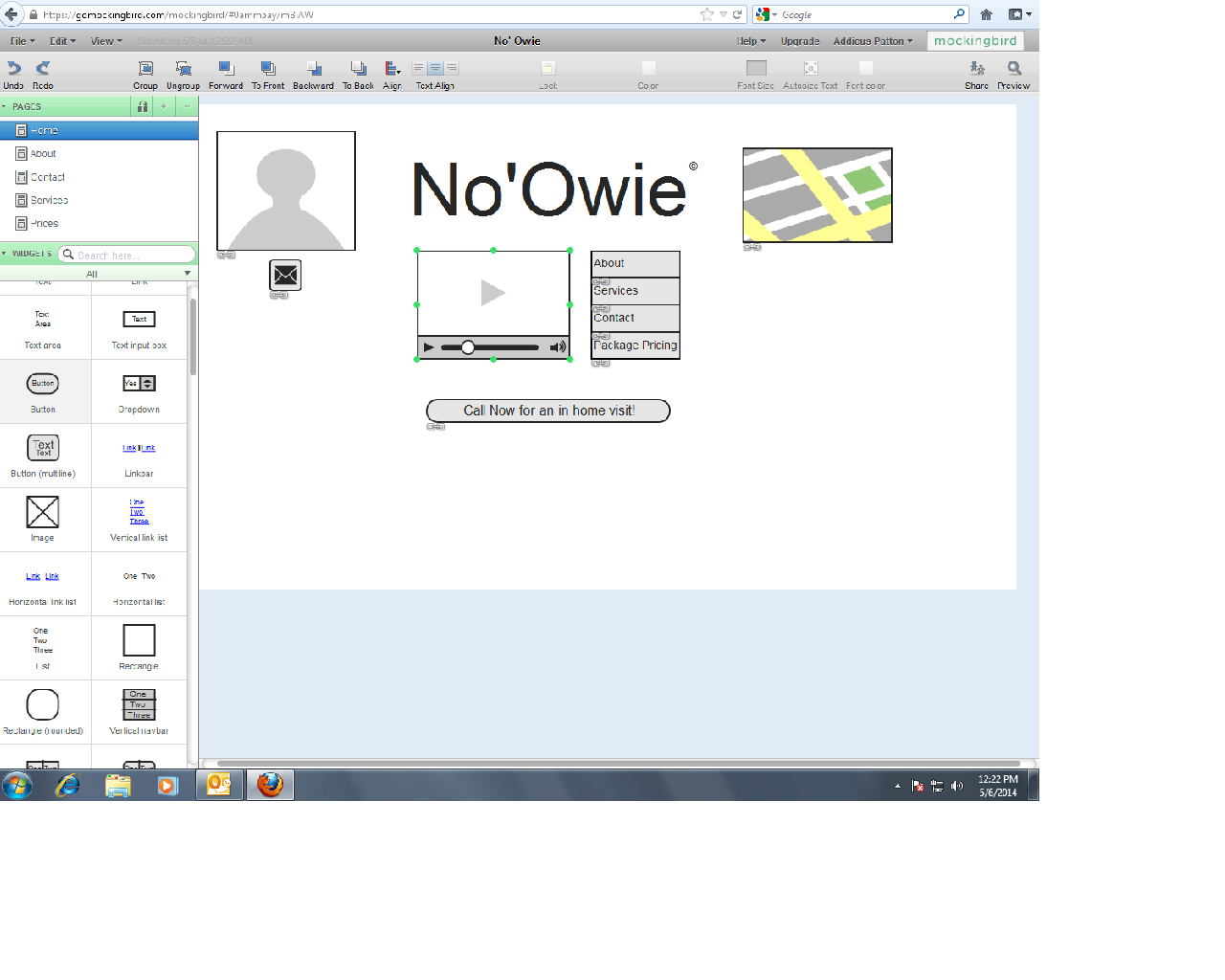
I went with Mockingbird to make my Wire Frame. It was a pretty easy program to figure out and I like how the mock up came out. The navigation tools were really easy to install. You can check out the whole mock up Here. The Website is a little sparse but I wanted to keep it easy to navigate for the intended audience with limited technical experience.


Monday, May 5, 2014

Week 1 Practice: Mission Statement

Business or Entity:
No' Owie Bandage Removal

Mission Statement:
This site will be a way for elderly patients and their family to find an in-home wound care specialist. The site will be user friendly for a clientele with minimal technical experience. It will show the care and expertise Harry will bring to his patients and their family to give everyone some peace of mind.

Week 1 Exploration: Project Inventory

For your week one Exploration I have put together this list of questions for a potential Client. Most likely I would put them into an online survey rather then just e-mail out the text questions. I think it would give a little more of a professional look.

1. What is the name of the business? What is the Businesses goal?
2. Where are you located? How far do your product/ service Reach?
3. How large is your organization? Do you plan to expand?
4. What do you want your customers to do on your website?
5. What is the goal of the website? (informative/commercial/fun)
6. What tone do you want your website? (Silly/serious/exciting/calming)
7. Describe your typical customer? Are you trying to expand your demographic? To What?
8. How many pages are you thinking for your site? How deep will the layers go?
9. What is your computer network like? Can you host your own site or do we need a server?
10. When do you want to see a prototype? When do you want to go live?
11. What is your budget for upkeep? How often do you want to update?

Live Doc is Here.

Thursday, October 24, 2013

WK4 MDC Jump Start

For the majority of customers trying out a new product the companies web site is the first impression. When creating a new web site for a company researching the competition is a good place to start. In the Designing Web Sites tutorial by Sue Jenkins she talks about key points you should look at when checking out the competitors web sites. I will be looking at how it could negatively affect the potential customers opinion of the company.
The first topic is doing a web search for keywords of the competitors. If you skip this step you may leave out words that will lead a customer to your new site. Knowing how a customer will search for you can help you with content descriptions and keywords. Next is narrowing the search to your local area. If you only do national or regional searches you may miss what the company down the street is doing and end up looking to much like theirs or having too similar of a product/service.

Sue Jenkins goes on to talk about setting site goals on having a plan for how the site will look and what it will contain. If you don’t stop to think about who your target audience is and what they will be looking for on your website you may choose the wrong color scheme or offensive wording. Next is content, if you skip the data checklist and just jump in to building the site you may forget some information you wanted to include. Taking the time before to hit all these steps before you post your site could save you from some professional embarrassment and time on rework.